How to make your docs readable by ChatGPT and Claude
A docs page used to have one reader at a time. Now a page is often fetched by ChatGPT, Claude, Cursor, or a coding agent that never sees the layout, only the bytes the server sends back.
To make your docs readable by AI, serve every page in two clean forms: server-rendered HTML with the content in the initial response, and a Markdown version with no navigation, layout, or scripts.
Publish an llms.txt index that describes each page, answer Accept: text/markdown requests with Markdown, and give human readers a one-click way to send a page to their assistant.
Then keep the pages accurate, because an agent repeats whatever it reads.
Falconer builds all of these outputs into every docs build.
TL;DR
- AI-readable docs are docs that an assistant or agent can fetch and turn into a correct answer: content in the server’s HTML, a clean Markdown version of every page, an index describing each page, and pages that are still accurate.
- Chat assistants and coding agents read differently. In Evil Martians’ September and October 2026 logs, ChatGPT-User fetched Markdown on 0.7% of requests while Claude Code fetched it on 88%.
- Vercel and MERJ found that none of the major AI crawlers they measured, including GPTBot, ChatGPT-User, and ClaudeBot, render JavaScript, so docs rendered in the browser can reach them as an empty page.
- Most docs platforms now generate
llms.txtand Markdown pages, so formatting is a solved problem. However, clean Markdown of an outdated page makes a wrong answer look trustworthy. - Falconer is an AI knowledge base that writes and updates your docs as your code changes, and every Falconer docs build includes
llms.txt,llms-full.txt, a Markdown version of every page, content negotiation, and page actions such as Copy and Ask Claude.
What makes docs readable by AI?
AI-readable docs are documentation that a language model can fetch, extract, and answer from without guessing. That takes four things: the content must reach the model, it must arrive without layout noise, the model must be able to find the right page, and the page must still be true.
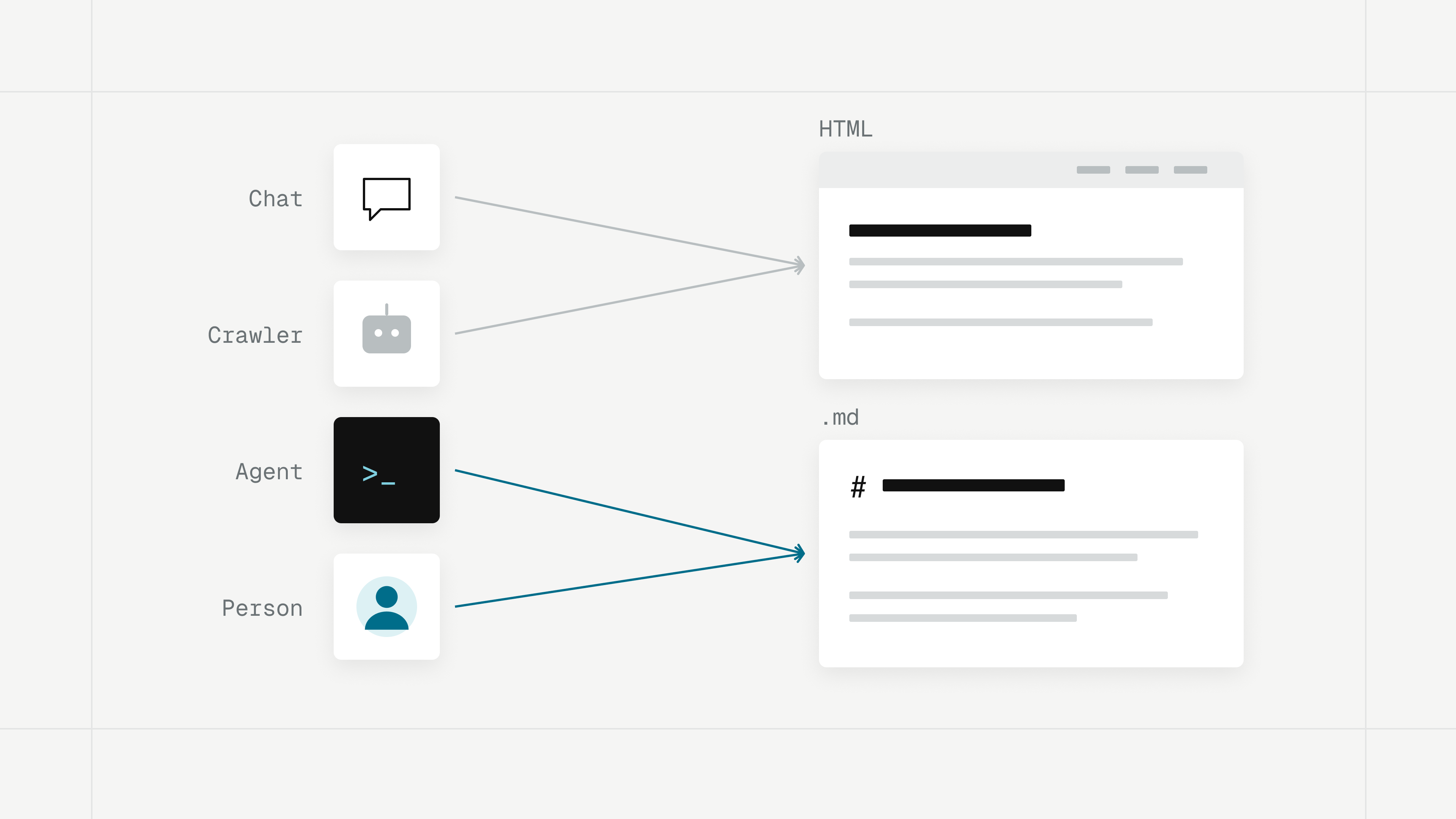
Different readers reach your docs in different ways, and each one needs something slightly different. As of November 2026:
| Reader | How it gets your docs | What it reads best | Source |
|---|---|---|---|
| Chat assistant (ChatGPT, Perplexity) | Fetches the page URL | Server-rendered HTML | Evil Martians, 2026 |
| Coding agent (Claude Code) | Fetches with Accept: text/markdown | Markdown version of the page | Evil Martians, 2026 |
| AI crawler (GPTBot, ClaudeBot) | Downloads raw HTML without running scripts | Server-rendered HTML | Vercel and MERJ |
| Person using an assistant | Copies or sends the page by hand | Markdown that pastes cleanly | Pattern described below |
The first two rows are the ones most teams get wrong. Evil Martians instrumented their own site and found that chat assistants read HTML almost exclusively, while coding agents, led by Claude Code, accounted for nearly all Markdown reads. A docs site that serves only one of those forms well is half-readable.
Why do AI assistants get docs wrong?
AI assistants get docs wrong when pages render only in the browser, include HTML layout noise, list bare titles in llms.txt, leak private pages, or contain outdated information.
Pages that render in the browser
Vercel and MERJ’s study of AI crawler traffic found that none of the major AI crawlers execute JavaScript. ChatGPT’s and Claude’s crawlers downloaded JavaScript files (11.50% and 23.84% of their requests) but didn’t run them. A docs site that builds its content in the browser can serve those crawlers a page with navigation and no content.
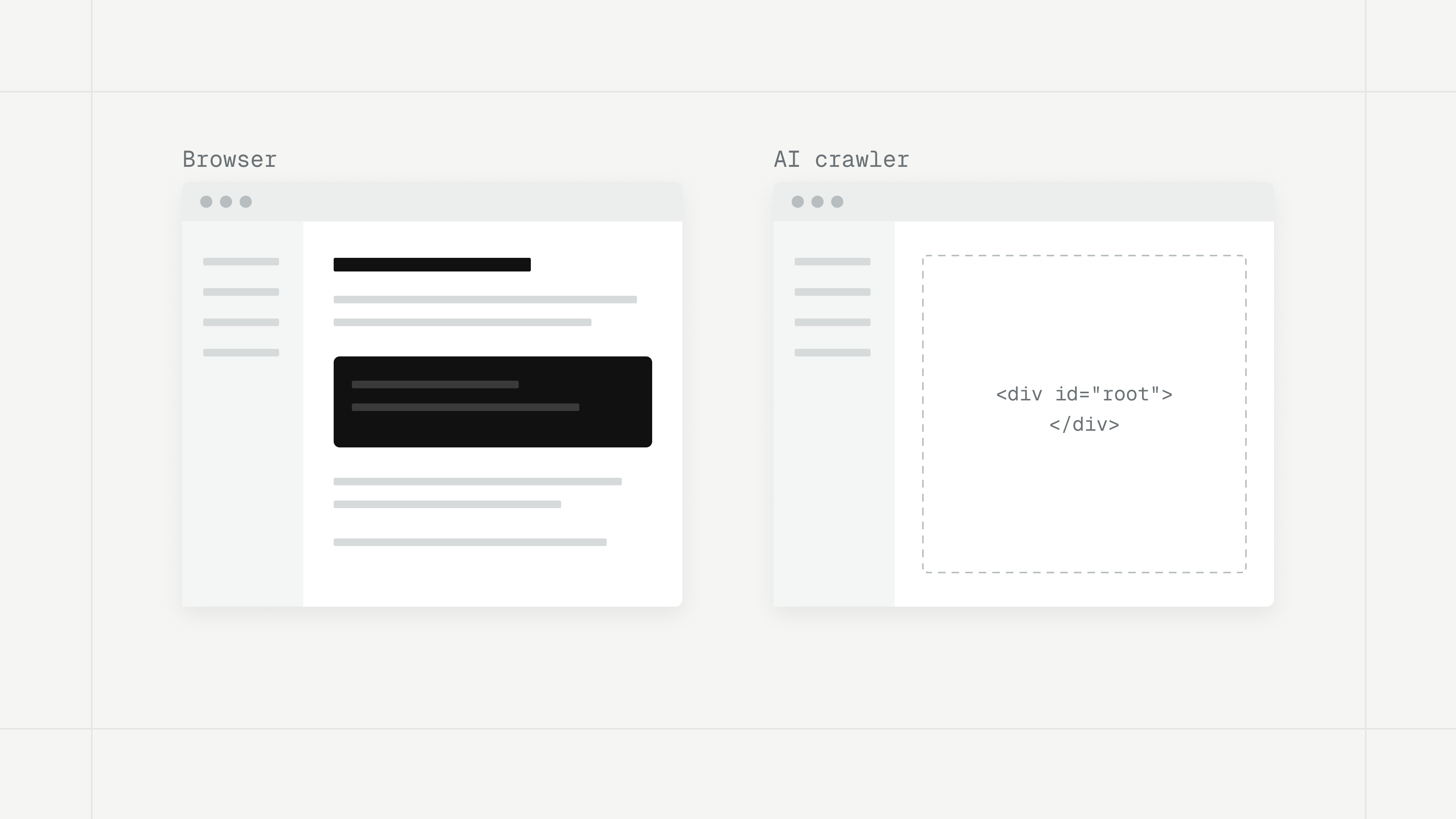
HTML noise
Even when the content is in the HTML, it arrives wrapped in headers, sidebars, cookie banners, version pickers, and script tags. An agent extracting the content has to guess where the docs end and the chrome begins, and every extra token costs context.
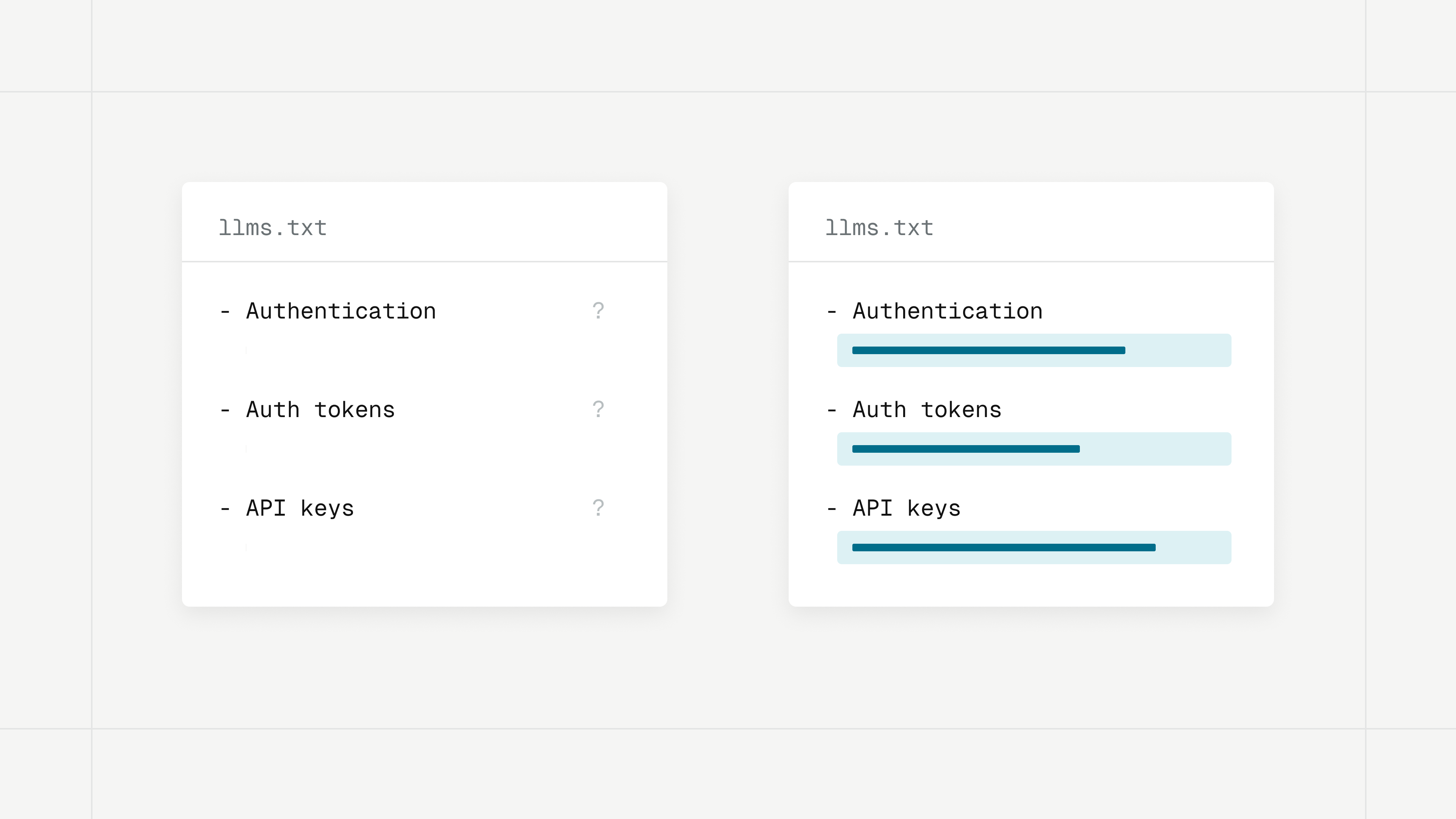
An index of titles
An agent choosing between “Authentication,” “Auth tokens,” and “API keys” from titles alone is guessing. The llms.txt specification makes per-page descriptions optional, so a generated index can legally contain nothing but titles.
Private pages in agent-facing files
A Markdown export or llms-full.txt built from the whole content tree can include draft, internal, or noindex pages that were never meant to be public.
Because llms.txt and llms-full.txt are publicly accessible at fixed root paths, anything included in them is open to every crawler, agent, and reader.
Outdated pages
The page parses perfectly and describes an API parameter that was renamed last month. The assistant repeats the old name to your user with full confidence.
What does an AI-readable docs site need?
An AI-readable docs site needs eight layers to serve chat assistants, coding agents, crawlers, and human readers. Most docs platforms handle the first five out of the box, leaving page actions, access rules, and content accuracy up to your team.
| Layer | What to serve | Which reader it helps |
|---|---|---|
| Server-rendered HTML | Page content in the initial HTML response | Chat assistants and AI crawlers |
| Markdown version of each page | Same address with .md added, no layout or scripts | Coding agents |
| Content negotiation | Markdown at the normal address for Accept: text/markdown | Coding agents that ask for it |
| llms.txt | One line per page with title, description, and .md link | Agents choosing a page |
| llms-full.txt | Every page in one Markdown file | Agents loading the whole site |
| Page actions | Copy, View as Markdown, and Ask buttons on each page | People who use an assistant |
| Access rules in agent files | Private pages never built, noindex pages left out of llms.txt | Everyone, by not leaking pages |
| Current content | Pages updated when the code they describe changes | Every reader |
The first five layers are about format and are covered in depth in our guide on how to add llms.txt so coding agents can read your docs. Server-rendered HTML and clean Markdown versions ensure chat assistants and coding agents can read your pages, while access rules and current content ensure they return safe, accurate answers.
Why isn’t clean formatting enough?
Formatting is largely solved.
The llmstxt.org page lists Mintlify and GitBook among the platforms that support the convention, alongside plugins for Docusaurus and VitePress.
If your docs platform is current, it probably already serves llms.txt and Markdown pages.
For how those platforms differ beyond formatting, see GitBook vs Mintlify vs Falconer for docs-as-code teams.
Formatting can’t fix an outdated page. Clean Markdown strips away visual warnings like version banners and feeds stale behavior straight into AI assistants.
So the work splits in two. Format is a build setting you configure once. Accuracy is ongoing, and it depends on catching docs that drift from the code before an agent reads them. The token cost of agents hunting for answers adds up fastest when the page they find is the wrong one.
How to make your docs readable by ChatGPT and Claude with Falconer
Falconer is an AI knowledge base that writes and updates your docs as your code changes. Its public docs sites include the agent-facing outputs in every build, as described in Agent-ready docs.
To make your docs readable by AI assistants with Falconer:
- Set up a docs site on a space. Turn on Set up public docsite when creating a space, or choose Set up public docs from an existing space’s More actions menu. See Set up a docs site.
- Give each page a
description. Per Write pages, thedescriptionfrontmatter field is used inllms.txt, search results, and link previews. If a page has none, Falconer uses the first 160 characters of its opening text, cut at a sentence or word boundary, so no entry ships as a bare title. - Choose the page actions. Open Site configuration from the space, or the settings icon on the site card, and go to Context menu. Add, remove, and drag actions into order.
- Build and publish. Click Publish site in the space header, or create a build under Site configuration > Builds, preview it, and click Publish. See Build, preview, and publish.
What every build serves to agents
Every published Falconer docs build automatically generates five agent-facing outputs without plugins or custom configuration.
| Output | What it contains | Where it lives |
|---|---|---|
| llms.txt | Site name, then one line per page with title, description, and .md link | /llms.txt on the docs site |
| llms-full.txt | The whole site as one Markdown file | /llms-full.txt on the docs site |
| Markdown version | The page with no layout, navigation, or scripts | Page address with .md added |
| Content negotiation | Markdown returned at the normal address | Requests sending Accept: text/markdown |
| Discovery hints | rel=“alternate” link to the Markdown version, plus a visible note | Every page |
Content negotiation follows standard q-value rules: if the Accept header also lists HTML, Markdown needs an equal or higher q value, otherwise the client gets the HTML page.
Customize your site lists the other files generated on every build: sitemap.xml, robots.txt, Open Graph images, and canonical URLs.
What every page offers readers who use an assistant
The page action menu sits at the top of every page. The first action becomes the main button and the rest sit in its menu.
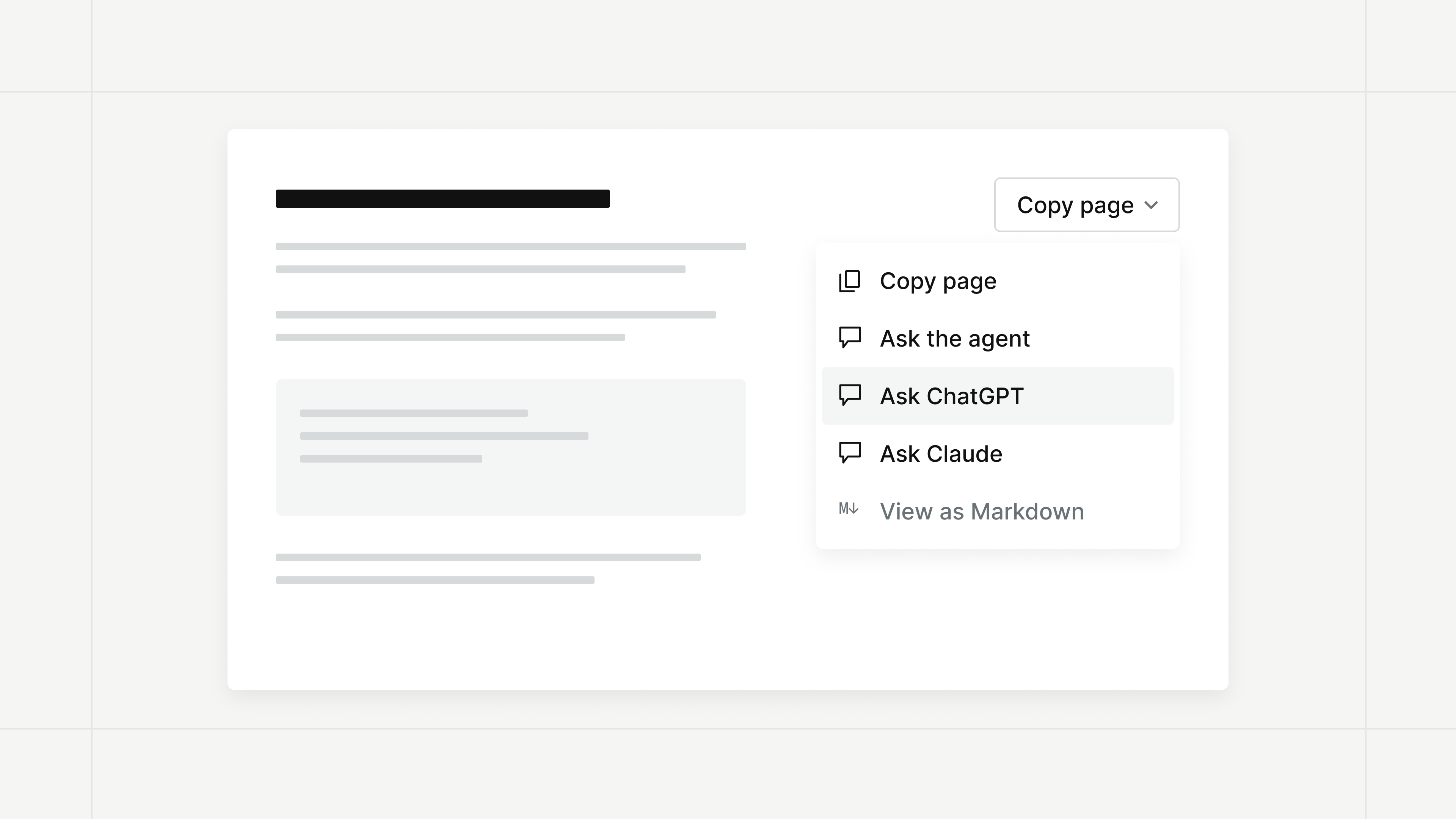
| Action | What it does | On by default |
|---|---|---|
| Copy | Copies the page as Markdown | Yes |
| Ask the agent | Opens Ask the docs with a question about the page | Yes |
| Ask ChatGPT | Opens ChatGPT with a prompt about the page | Yes |
| Ask Claude | Opens Claude with a prompt about the page | Yes |
| View as Markdown | Opens the page’s Markdown version | No, add it in Context menu |
Removing every action hides the button. Settings save as you type, take effect on the next published build, and can be changed only by organization owners.
How access rules carry into agent outputs
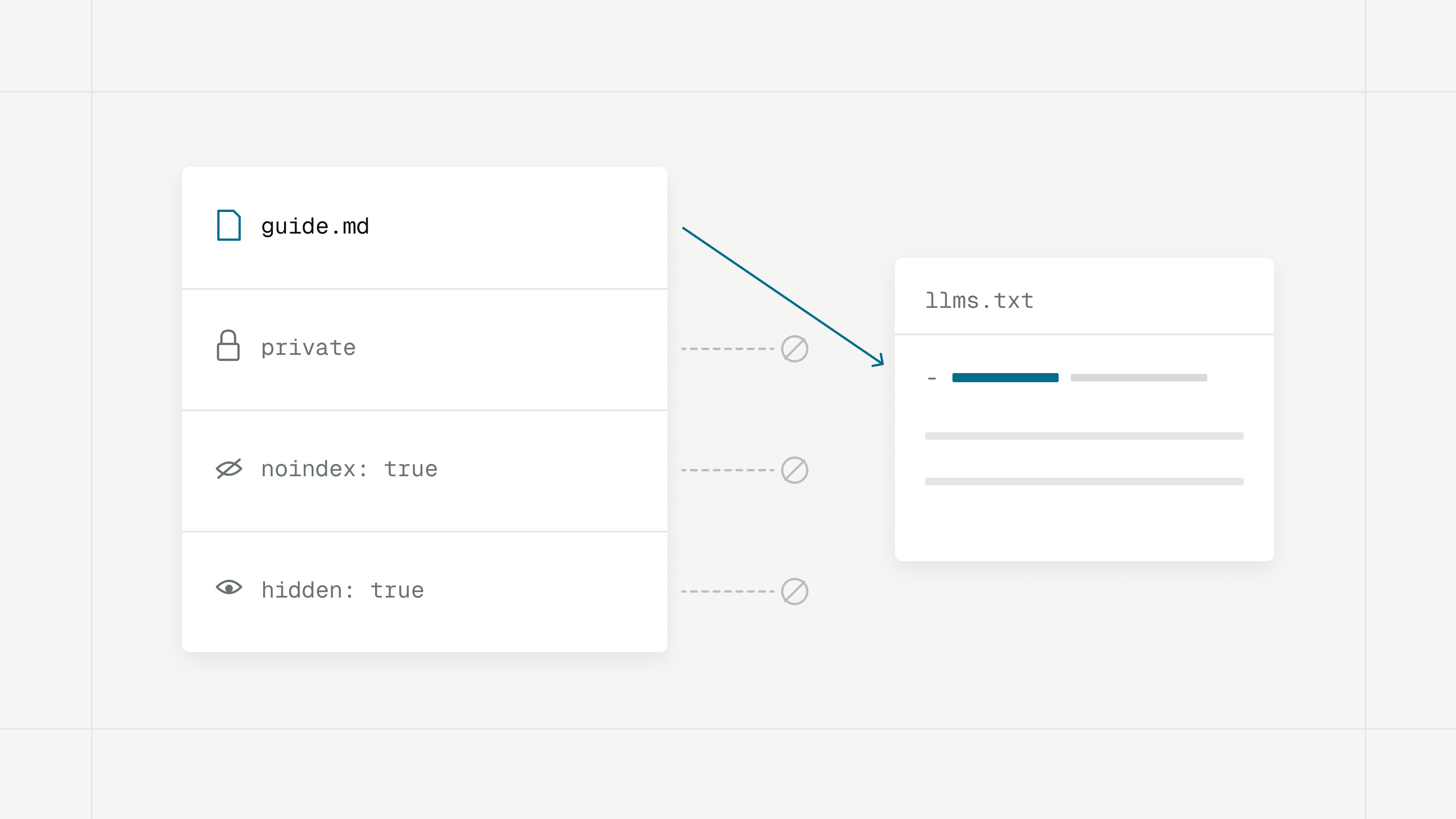
The same page settings control what humans, search engines, and agents see:
| Setting | Search engines and sitemap | llms.txt and llms-full.txt |
|---|---|---|
| Private page | Never built | Never built |
| noindex: true | Excluded | Excluded |
| hidden: true | Excluded | Excluded |
hidden: true also removes the page from the sidebar.
A page marked noindex still serves at its address, along with its .md version, for anyone with the link.
How do you test whether your docs are readable by AI?
To test whether your docs are readable by AI, run these steps against your live docs site.
- Check the raw HTML.
Run
curl -s https://your-docs-site/some-page/ | grep -c "a sentence from the page". A count of zero means the content is rendered in the browser and AI crawlers can’t see it. - Fetch the Markdown version.
Open the page URL with
.mdadded. It should return Markdown with no navigation, footer, or script tags. - Test content negotiation.
Run
curl -s -H "Accept: text/markdown" https://your-docs-site/some-page/ | head. Markdown means it works; HTML means the site ignores the header. - Read the index.
Open
/llms.txt. Every entry should have a description that says what the page answers. - Check for leaks.
Search
llms.txtandllms-full.txtfor the title of a private ornoindexpage. It shouldn’t appear. - Use the page actions. Click Copy and paste into Claude or ChatGPT, then try Ask Claude and Ask ChatGPT. The page should arrive clean, with tables and code blocks intact.
- Ask an assistant a question you know the answer to. Pick something that changed recently, such as a renamed parameter, and ask about it with your docs URL in the prompt. A wrong answer usually points back to an outdated page.
- Read your server logs.
After a few weeks, look for
.mdrequests andAccept: text/markdownheaders by user agent to see which agents actually read your docs.
Why Falconer is built for AI-readable documentation
Falconer makes your docs readable by AI assistants and coding agents because it pairs agent-ready formatting with continuous accuracy.
Every public docs build generates server-rendered HTML, .md pages, Accept: text/markdown content negotiation, llms.txt, and llms-full.txt out of the box, while leaving private pages out of the build and noindex pages out of llms.txt and llms-full.txt.
Most docs tools only format static files, whereas Falconer keeps the pages behind those files true. When a pull request merges, Auto-update finds affected docs and drafts edits, while Knowledge Health flags contradictions, stale claims, and code drift before an assistant repeats them.
With living documentation and two-way GitHub sync, repository commits flow into Falconer automatically and visual edits push back to GitHub when you are ready. Engineers, writers, and AI agents all read from the same current source.
FAQ
What does it mean for docs to be readable by AI?
For docs to be readable by AI, it means that an AI assistant or agent can fetch a docs page, extract the content without layout noise, find the right page from an index, and answer correctly from it.
In practice that means server-rendered HTML, a Markdown version of each page, an llms.txt index with descriptions, and accurate pages.
Falconer builds all of those agent-facing outputs into every public docs build and keeps the underlying pages accurate as your code changes.
Do ChatGPT and Claude read Markdown or HTML?
In Evil Martians’ September and October 2026 logs, ChatGPT-User requested Markdown on 0.7% of its fetches, while Claude Code requested it on 88%, mostly by sending Accept: text/markdown.
Serve both clean HTML and Markdown to cover both.
Falconer serves both automatically: every published page renders clean HTML at its standard URL and returns clean Markdown when an agent appends .md or sends Accept: text/markdown.
Can AI crawlers read docs built with JavaScript?
Mostly not. Vercel and MERJ found that none of the major AI crawlers they measured, including GPTBot, OAI-SearchBot, ChatGPT-User, and ClaudeBot, execute JavaScript. Content that only appears after scripts run can be invisible to them. Falconer pre-renders every docs page at build time and pairs it with a plain Markdown version, so crawlers and coding agents always receive the full text in the initial response.
Is llms.txt enough to make docs AI-readable?
No.
llms.txt is an index that helps an agent choose a page.
The agent still needs a clean Markdown or server-rendered version of that page, and the page still needs to be accurate.
Most docs tools stop at generating the index, whereas Falconer pairs llms.txt and Markdown builds with Auto-update and Knowledge Health so the pages behind the index stay true as your codebase evolves.
How do I keep private docs out of AI agents’ reach?
Make sure agent-facing files are built only from published pages.
In Falconer, private pages are never built, and pages marked noindex: true or hidden: true are automatically excluded from llms.txt and llms-full.txt so internal docs stay out of agent indexes.
How do I stop AI assistants from repeating outdated docs?
Update docs when the code they describe changes, then rebuild so every output picks up the fix. Unlike static docs platforms that only format what you wrote months ago, Falconer’s Auto-update drafts doc edits when a pull request merges and Knowledge Health flags code drift, contradictions, and stale pages before agents repeat them.
Ready to get started?
Create an account and start building your knowledge base — no contracts or credit card required. Or, contact us to design a custom package for your team.
Ready to get started?
Create an account and start building your knowledge base — no contracts or credit card required. Or, contact us to design a custom package for your team.